
In this quick article. We will show you how to reset your view in Microsoft Outlook.
If you ever messed up your view and unsure how to get the default view back perform the following:
Step 1
Open Microsoft Outlook
Step 2
Locate the top ribbon and click the "View" tab

Step 3
Click on the "Reset View" button to set your Outlook client view to the default
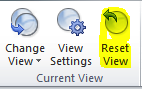
Your views should now be back to system default.
Not what you looking for? Log an incident for assistance.
Comments
0 comments
Please sign in to leave a comment.